10 Nextflow
The same LTEE pipeline in a second workflow manager: same steps, same options, same answer
- Time: 40 minutes in class, at the end of the lesson 09 lab (sections 1 to 3: concepts, toy example, run the finished pipeline); the rest (4 to 9) at home, about 2 hours.
- Slides: Nextflow
- You need: the
ltee-projectafter lesson 09 (Snakemake results inresults/,config/config.yaml). - You will have:
workflow/nextflow/main.nf, which runs the same pipeline as your Snakefile and gives identical variant calls.
Overview
Nextflow is the other widely used workflow manager in bioinformatics, and the engine behind the nf-core pipelines. Where Snakemake starts from the files you want and works backwards, Nextflow starts from the data and pushes it forwards: processes (the steps) are connected by channels (queues of data, such as one item per sample). Nextflow runs each task in its own folder under work/, which makes resuming a stopped run cheap and moving to clusters or the cloud easy.
You build the same LTEE pipeline as in lesson 09, with the same steps, options and config file, and check that both tools give identical variant calls. If they did not, at least one of the pipelines would be wrong.
The Seqera training (Hello Nextflow, Nextflow Run, Nextflow for Science: Genomics) is excellent and free for home study; its license (CC BY-NC-SA 4.0) does not allow us to copy it, so we link to it.
Learning outcomes
After this lesson you can:
- Explain processes, channels and workflow outputs, and run a Nextflow workflow through Pixi.
- Read a sample sheet into a channel and connect processes so that each sample flows through the pipeline.
- Run the LTEE pipeline in Nextflow with the same config file as Snakemake, resume it after a change, and show that it reproduces the Snakemake variant calls.
- Decide when to use Snakemake, Nextflow or an nf-core pipeline for a project.
Checks: pixi run compare-workflows reports identical variants (outcome 3); -resume reruns only the changed process (3).
In class (40 minutes)
1. Processes, channels, outputs: a toy
The toy from lesson 09, now in Nextflow. In a practice folder:
mkdir -p ~/cbio7501/nextflow-practice
cd ~/cbio7501/nextflow-practice
echo "This is a.txt" > a.txt
echo "This is b.txt" > b.txt
main.nf
process CONVERT_TO_UPPER_CASE {
    input:
    path file

    output:
    path "${file.baseName}.upper.txt"

    script:
    """
    tr a-z A-Z < ${file} > ${file.baseName}.upper.txt
    """
}

workflow {
    main:
    ch_input = channel.fromPath("*.txt")
    ch_upper = CONVERT_TO_UPPER_CASE(ch_input)

    publish:
    upper = ch_upper
}

output {
    upper {
        path '.'
    }
}- A process declares its
input:,output:and thescript:that turns one into the other. It does not say where results go. - The workflow creates a channel (
channel.fromPath("*.txt")emits one item per matching file), passes it to the process, and assigns the result to a channel. Underpublish:it names the workflow outputs. - The output block says where each workflow output is saved, inside the output folder (
results/by default).
Run it (through pixi exec; the project gets its own Nextflow below):
pixi exec -c conda-forge -c bioconda nextflow run main.nf
ls results work
[SUCCESS] completed=2 failed=0 cached=0Two tasks ran, one per file, in parallel, each in its own folder under work/. Run it again with -resume:
pixi exec -c conda-forge -c bioconda nextflow run main.nf -resume[SUCCESS] completed=0 failed=0 cached=2Nothing changed, so both tasks come from the cache.
| Snakemake | Nextflow | |
|---|---|---|
| You write | rules: output from input | processes, connected by channels |
| Direction | from the files you ask for, backwards | from the input data, forwards |
| Up to date? | output newer than input, plus code/params | task cache in work/, with -resume |
| Language | Python | Groovy-like DSL |
| Community pipelines | Snakemake workflow catalog | nf-core |
2. Add Nextflow to the project
cd ~/cbio7501/ltee-project
pixi add --feature pipeline nextflow
pixi run -e pipeline nextflow -version
git switch -c lesson-10-nextflowNextflow keeps its task folders in work/ and logs in .nextflow*; the template’s .gitignore already ignores them.
3. Run the finished pipeline
In class there is no time to write the whole pipeline, so take the finished main.nf (section 6 explains it), and its configuration:
workflow/nextflow/main.nf
// LTEE variant calling with Nextflow.
//
// Same steps and tool options as workflow/Snakefile, which follow Data
// Carpentry "Wrangling Genomics" (variant calling episode, CC BY 4.0,
// https://datacarpentry.github.io/wrangling-genomics/04-variant_calling.html),
// with FastQC and MultiQC added at the start.
//
// Run from the project folder, with the same settings file as Snakemake:
//   pixi run run-nextflow
// (or: pixi run -e pipeline nextflow run workflow/nextflow/main.nf -params-file config/config.yaml)
// Results go to results/nextflow/ (set in workflow/nextflow/nextflow.config).

params {
    // Tab-separated sample sheet with sample, fastq_1 and fastq_2 columns
    samples: Path = 'metadata/samples.tsv'
    // Gzipped reference genome (E. coli REL606)
    reference_gz: Path = 'data/raw/reference/ecoli_rel606.fasta.gz'
    // Extra bwa mem options (-K makes alignments independent of the thread count)
    bwa_extra: String = '-K 10000000'
    // Minimum read depth for the final filter (vcfutils.pl varFilter -d)
    min_depth: Integer = 2
    // Depth thresholds compared for the analysis question
    sensitivity_depths: List<Integer> = [2, 5, 10, 15]
}

process FASTQC {
    tag "${sample}"

    input:
    tuple val(sample), path(reads)

    output:
    path '*_fastqc.html', emit: html
    path '*_fastqc.zip', emit: zip

    script:
    """
    fastqc --quiet ${reads}
    """
}

process MULTIQC {
    input:
    path zips

    output:
    path 'multiqc_report.html'

    script:
    """
    multiqc --force ${zips}
    """
}

process PREPARE_REFERENCE {
    input:
    path reference_gz

    output:
    tuple path('ecoli_rel606.fasta'), path('ecoli_rel606.fasta.*')

    script:
    """
    gunzip -c ${reference_gz} > ecoli_rel606.fasta
    bwa index ecoli_rel606.fasta
    """
}

process ALIGN {
    tag "${sample}"
    cpus 4

    input:
    tuple val(sample), path(reads)
    tuple path(genome), path(index)
    val bwa_extra

    output:
    tuple val(sample), path("${sample}.aligned.sorted.bam"), path("${sample}.aligned.sorted.bam.bai")

    script:
    """
    bwa mem -t ${task.cpus} ${bwa_extra} ${genome} ${reads[0]} ${reads[1]} > ${sample}.aligned.sam
    samtools view -S -b ${sample}.aligned.sam > ${sample}.aligned.bam
    samtools sort -o ${sample}.aligned.sorted.bam ${sample}.aligned.bam
    samtools index ${sample}.aligned.sorted.bam
    """
}

process FLAGSTAT {
    tag "${sample}"

    input:
    tuple val(sample), path(bam), path(bai)

    output:
    path "${sample}.flagstat.txt"

    script:
    """
    samtools flagstat ${bam} > ${sample}.flagstat.txt
    """
}

process CALL_VARIANTS {
    tag "${sample}"

    input:
    tuple val(sample), path(bam), path(bai)
    tuple path(genome), path(index)

    output:
    tuple val(sample), path("${sample}_variants.vcf")

    script:
    """
    bcftools mpileup -O b -o ${sample}_raw.bcf -f ${genome} ${bam}
    bcftools call --ploidy 1 -m -v -o ${sample}_variants.vcf ${sample}_raw.bcf
    """
}

process FILTER_VARIANTS {
    tag "${sample}"

    input:
    tuple val(sample), path(variants)
    val min_depth

    output:
    tuple val(sample), path("${sample}_final_variants.vcf")

    script:
    """
    vcfutils.pl varFilter -d ${min_depth} ${variants} > ${sample}_final_variants.vcf
    """
}

process DEPTH_SENSITIVITY {
    tag "${sample} d${depth}"

    input:
    tuple val(sample), path(variants), val(depth)

    output:
    path "${sample}_d${depth}.vcf"

    script:
    """
    vcfutils.pl varFilter -d ${depth} ${variants} > ${sample}_d${depth}.vcf
    """
}

process VARIANT_STATS {
    tag "${sample}"

    input:
    tuple val(sample), path(final_variants)

    output:
    path "${sample}.bcftools-stats.txt"

    script:
    """
    bcftools stats ${final_variants} > ${sample}.bcftools-stats.txt
    """
}

workflow {
    main:
    ch_samples = channel.fromPath(params.samples)
        .splitCsv(header: true, sep: '\t')
        .map { row -> tuple(row.sample, [file(row.fastq_1), file(row.fastq_2)]) }

    ch_fastqc = FASTQC(ch_samples)
    ch_multiqc = MULTIQC(ch_fastqc.zip.collect())

    ch_reference = PREPARE_REFERENCE(params.reference_gz)
    ch_bam = ALIGN(ch_samples, ch_reference, params.bwa_extra)
    ch_flagstat = FLAGSTAT(ch_bam)
    ch_variants = CALL_VARIANTS(ch_bam, ch_reference)
    ch_final = FILTER_VARIANTS(ch_variants, params.min_depth)
    ch_stats = VARIANT_STATS(ch_final)
    ch_sensitivity = DEPTH_SENSITIVITY(ch_variants.combine(channel.fromList(params.sensitivity_depths)))

    publish:
    fastqc = ch_fastqc.html.mix(ch_fastqc.zip)
    multiqc = ch_multiqc
    bam = ch_bam
    variants = ch_variants
    final_variants = ch_final
    stats = ch_flagstat.mix(ch_stats)
    sensitivity = ch_sensitivity
}

output {
    fastqc {
        path 'qc/fastqc'
    }
    multiqc {
        path 'qc/multiqc'
    }
    bam {
        path 'bam'
    }
    variants {
        path 'bcf'
    }
    final_variants {
        path 'vcf'
    }
    stats {
        path 'stats'
    }
    sensitivity {
        path 'sensitivity'
    }
}
workflow/nextflow/nextflow.config
// Settings for running the LTEE pipeline on a laptop.
// Software comes from the Pixi environment that launches Nextflow
// (pixi run nextflow ...), so no conda or container settings are needed here.

outputDir = 'results/nextflow'

workflow.output.mode = 'copy'

process {
    cpus = 1
    // Never ask for more CPUs than this computer has: ALIGN asks for 4,
    // a Codespace has 2. A larger request is lowered to this limit.
    resourceLimits = [cpus: Runtime.runtime.availableProcessors()]
}
Run it from the project folder, with the same config file as Snakemake:
pixi run -e pipeline nextflow run workflow/nextflow/main.nf -params-file config/config.yaml[SUCCESS] completed=32 failed=0 cached=0Compare its variant calls with Snakemake’s:
pixi run python scripts/compare_vcfs.py results/vcf results/nextflow/vcfSRR2584863_final_variants.vcf: identical (25 variants)
SRR2584866_final_variants.vcf: identical (775 variants)
SRR2589044_final_variants.vcf: identical (10 variants)Two workflow managers, written independently, give the same answer. That is a strong check that both pipelines do what the Data Carpentry lesson does.
At home: how the pipeline is built
4. Start small: quality control only
To learn the pieces, rebuild the pipeline in two steps. First a version that only does quality control. Replace workflow/nextflow/main.nf with:
workflow/nextflow/main.nf
// LTEE variant calling with Nextflow.
//
// Same steps and tool options as workflow/Snakefile, which follow Data
// Carpentry "Wrangling Genomics" (variant calling episode, CC BY 4.0,
// https://datacarpentry.github.io/wrangling-genomics/04-variant_calling.html),
// with FastQC and MultiQC added at the start.
//
// Run from the project folder, with the same settings file as Snakemake:
//   pixi run run-nextflow
// (or: pixi run -e pipeline nextflow run workflow/nextflow/main.nf -params-file config/config.yaml)
// Results go to results/nextflow/ (set in workflow/nextflow/nextflow.config).

params {
    // Tab-separated sample sheet with sample, fastq_1 and fastq_2 columns
    samples: Path = 'metadata/samples.tsv'
    // Gzipped reference genome (E. coli REL606)
    reference_gz: Path = 'data/raw/reference/ecoli_rel606.fasta.gz'
    // Extra bwa mem options (-K makes alignments independent of the thread count)
    bwa_extra: String = '-K 10000000'
    // Minimum read depth for the final filter (vcfutils.pl varFilter -d)
    min_depth: Integer = 2
    // Depth thresholds compared for the analysis question
    sensitivity_depths: List<Integer> = [2, 5, 10, 15]
}

process FASTQC {
    tag "${sample}"

    input:
    tuple val(sample), path(reads)

    output:
    path '*_fastqc.html', emit: html
    path '*_fastqc.zip', emit: zip

    script:
    """
    fastqc --quiet ${reads}
    """
}

process MULTIQC {
    input:
    path zips

    output:
    path 'multiqc_report.html'

    script:
    """
    multiqc --force ${zips}
    """
}

workflow {
    main:
    ch_samples = channel.fromPath(params.samples)
        .splitCsv(header: true, sep: '\t')
        .map { row -> tuple(row.sample, [file(row.fastq_1), file(row.fastq_2)]) }

    ch_fastqc = FASTQC(ch_samples)
    ch_multiqc = MULTIQC(ch_fastqc.zip.collect())

    publish:
    fastqc = ch_fastqc.html.mix(ch_fastqc.zip)
    multiqc = ch_multiqc
}

output {
    fastqc {
        path 'qc/fastqc'
    }
    multiqc {
        path 'qc/multiqc'
    }
}
Read it from the top:
- The
paramsblock declares the pipeline’s parameters with a type and a default (samples: Path = 'metadata/samples.tsv'). Values inconfig/config.yaml, passed with-params-file, override the defaults; a single value can also be set on the command line, for example--min_depth 10. The same YAML file drives Snakemake and Nextflow. - The sample sheet becomes a channel:
channel.fromPath(params.samples)emits the file,.splitCsv(header: true, sep: '\t')turns it into one record per row, and.map { ... }keeps what the processes need: a tuple of the sample ID and its two FASTQ files. tag "${sample}"labels each FastQC task with its sample in the log.emit: html/emit: zipname the two outputs of FASTQC, used asch_fastqc.zip..collect()waits for all FastQC zips and passes them to MultiQC as one list: MultiQC runs once, after every FastQC task.
pixi run -e pipeline nextflow run workflow/nextflow/main.nf -params-file config/config.yaml -output-dir results/nextflow-qc
ls results/nextflow-qc/qc/multiqc
5. Look at a task
Every task runs in its own folder under work/, with its inputs linked in and the exact command in .command.sh:
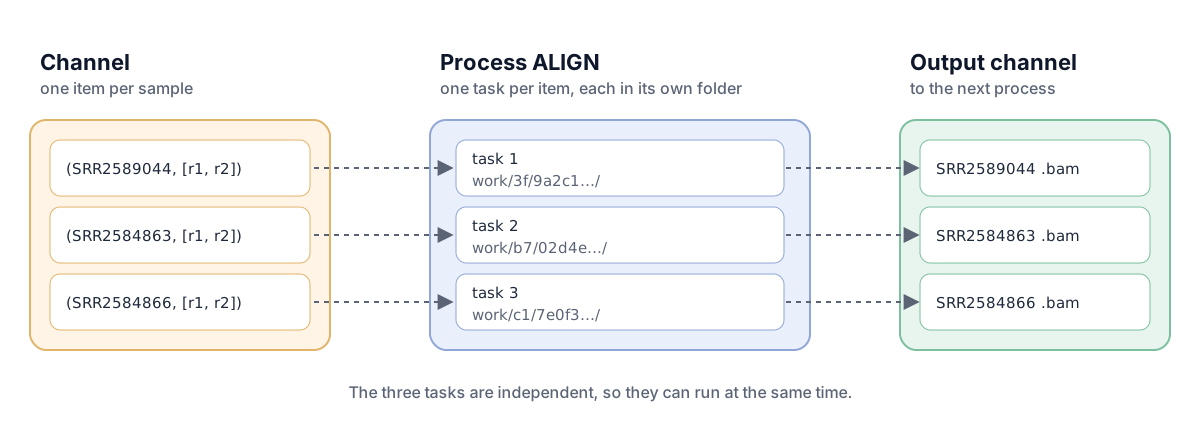
work/; the tasks’ outputs form the channel for the next process. Diagram: Reproducible and Open Science lessons, CC BY 4.0.d=$(dirname "$(find work -name .command.sh | head -1)")
ls -a "$d"
cat "$d/.command.sh"When a task fails, Nextflow prints its work folder; cd there, read .command.err and .command.log, and run bash .command.sh to reproduce the error by hand.
6. The full pipeline
Put the full main.nf back (the same file as in section 3):
workflow/nextflow/main.nf
// LTEE variant calling with Nextflow.
//
// Same steps and tool options as workflow/Snakefile, which follow Data
// Carpentry "Wrangling Genomics" (variant calling episode, CC BY 4.0,
// https://datacarpentry.github.io/wrangling-genomics/04-variant_calling.html),
// with FastQC and MultiQC added at the start.
//
// Run from the project folder, with the same settings file as Snakemake:
//   pixi run run-nextflow
// (or: pixi run -e pipeline nextflow run workflow/nextflow/main.nf -params-file config/config.yaml)
// Results go to results/nextflow/ (set in workflow/nextflow/nextflow.config).

params {
    // Tab-separated sample sheet with sample, fastq_1 and fastq_2 columns
    samples: Path = 'metadata/samples.tsv'
    // Gzipped reference genome (E. coli REL606)
    reference_gz: Path = 'data/raw/reference/ecoli_rel606.fasta.gz'
    // Extra bwa mem options (-K makes alignments independent of the thread count)
    bwa_extra: String = '-K 10000000'
    // Minimum read depth for the final filter (vcfutils.pl varFilter -d)
    min_depth: Integer = 2
    // Depth thresholds compared for the analysis question
    sensitivity_depths: List<Integer> = [2, 5, 10, 15]
}

process FASTQC {
    tag "${sample}"

    input:
    tuple val(sample), path(reads)

    output:
    path '*_fastqc.html', emit: html
    path '*_fastqc.zip', emit: zip

    script:
    """
    fastqc --quiet ${reads}
    """
}

process MULTIQC {
    input:
    path zips

    output:
    path 'multiqc_report.html'

    script:
    """
    multiqc --force ${zips}
    """
}

process PREPARE_REFERENCE {
    input:
    path reference_gz

    output:
    tuple path('ecoli_rel606.fasta'), path('ecoli_rel606.fasta.*')

    script:
    """
    gunzip -c ${reference_gz} > ecoli_rel606.fasta
    bwa index ecoli_rel606.fasta
    """
}

process ALIGN {
    tag "${sample}"
    cpus 4

    input:
    tuple val(sample), path(reads)
    tuple path(genome), path(index)
    val bwa_extra

    output:
    tuple val(sample), path("${sample}.aligned.sorted.bam"), path("${sample}.aligned.sorted.bam.bai")

    script:
    """
    bwa mem -t ${task.cpus} ${bwa_extra} ${genome} ${reads[0]} ${reads[1]} > ${sample}.aligned.sam
    samtools view -S -b ${sample}.aligned.sam > ${sample}.aligned.bam
    samtools sort -o ${sample}.aligned.sorted.bam ${sample}.aligned.bam
    samtools index ${sample}.aligned.sorted.bam
    """
}

process FLAGSTAT {
    tag "${sample}"

    input:
    tuple val(sample), path(bam), path(bai)

    output:
    path "${sample}.flagstat.txt"

    script:
    """
    samtools flagstat ${bam} > ${sample}.flagstat.txt
    """
}

process CALL_VARIANTS {
    tag "${sample}"

    input:
    tuple val(sample), path(bam), path(bai)
    tuple path(genome), path(index)

    output:
    tuple val(sample), path("${sample}_variants.vcf")

    script:
    """
    bcftools mpileup -O b -o ${sample}_raw.bcf -f ${genome} ${bam}
    bcftools call --ploidy 1 -m -v -o ${sample}_variants.vcf ${sample}_raw.bcf
    """
}

process FILTER_VARIANTS {
    tag "${sample}"

    input:
    tuple val(sample), path(variants)
    val min_depth

    output:
    tuple val(sample), path("${sample}_final_variants.vcf")

    script:
    """
    vcfutils.pl varFilter -d ${min_depth} ${variants} > ${sample}_final_variants.vcf
    """
}

process DEPTH_SENSITIVITY {
    tag "${sample} d${depth}"

    input:
    tuple val(sample), path(variants), val(depth)

    output:
    path "${sample}_d${depth}.vcf"

    script:
    """
    vcfutils.pl varFilter -d ${depth} ${variants} > ${sample}_d${depth}.vcf
    """
}

process VARIANT_STATS {
    tag "${sample}"

    input:
    tuple val(sample), path(final_variants)

    output:
    path "${sample}.bcftools-stats.txt"

    script:
    """
    bcftools stats ${final_variants} > ${sample}.bcftools-stats.txt
    """
}

workflow {
    main:
    ch_samples = channel.fromPath(params.samples)
        .splitCsv(header: true, sep: '\t')
        .map { row -> tuple(row.sample, [file(row.fastq_1), file(row.fastq_2)]) }

    ch_fastqc = FASTQC(ch_samples)
    ch_multiqc = MULTIQC(ch_fastqc.zip.collect())

    ch_reference = PREPARE_REFERENCE(params.reference_gz)
    ch_bam = ALIGN(ch_samples, ch_reference, params.bwa_extra)
    ch_flagstat = FLAGSTAT(ch_bam)
    ch_variants = CALL_VARIANTS(ch_bam, ch_reference)
    ch_final = FILTER_VARIANTS(ch_variants, params.min_depth)
    ch_stats = VARIANT_STATS(ch_final)
    ch_sensitivity = DEPTH_SENSITIVITY(ch_variants.combine(channel.fromList(params.sensitivity_depths)))

    publish:
    fastqc = ch_fastqc.html.mix(ch_fastqc.zip)
    multiqc = ch_multiqc
    bam = ch_bam
    variants = ch_variants
    final_variants = ch_final
    stats = ch_flagstat.mix(ch_stats)
    sensitivity = ch_sensitivity
}

output {
    fastqc {
        path 'qc/fastqc'
    }
    multiqc {
        path 'qc/multiqc'
    }
    bam {
        path 'bam'
    }
    variants {
        path 'bcf'
    }
    final_variants {
        path 'vcf'
    }
    stats {
        path 'stats'
    }
    sensitivity {
        path 'sensitivity'
    }
}
What is new compared with the QC-only version:
PREPARE_REFERENCEruns once. Its input is a single value (a path, not a channel of many items), so its output is a value channel that everyALIGNandCALL_VARIANTStask can read again and again.ALIGNcombines four commands (bwa mem,samtools view,sort,index) in one task: fewer, larger tasks are usual in Nextflow.cpus 4gives it four threads, and${task.cpus}passes them tobwa mem. Thebwa_extraparameter (-K 10000000) keeps the result independent of the thread count, as in lesson 09. On a computer with fewer than four CPUs,resourceLimitsinnextflow.configlowers the request to what the computer has.FILTER_VARIANTSgets the threshold as an input (val min_depth), not by readingparamsinside the process: processes only see what they are given.DEPTH_SENSITIVITYuses.combine()to pair every sample’s variants with every depth insensitivity_depths: 3 samples × 4 depths = 12 tasks.publish:andoutput {}save each result in the same folder layout as Snakemake, underresults/nextflow/(set byoutputDirinnextflow.config, whereworkflow.output.mode = 'copy'makes real copies instead of links intowork/).
Check the syntax with Nextflow’s linter, then run it with -resume:
pixi run -e pipeline nextflow lint workflow/nextflow/
pixi run -e pipeline nextflow run workflow/nextflow/main.nf -params-file config/config.yaml -resume
[SUCCESS] completed=28 failed=0 cached=4-resume reuses the tasks of the previous run, which was the QC-only version: its four tasks (three FastQC, one MultiQC) are identical, so they come from the cache; everything else runs.
Change one setting, resume
Rerun with a stricter filter and -resume. Predict which processes rerun:
pixi run -e pipeline nextflow run workflow/nextflow/main.nf -params-file config/config.yaml --min_depth 10 -resume -output-dir results/nextflow-d10
for f in results/nextflow-d10/vcf/*_final_variants.vcf; do echo "$f $(grep -vc '^#' "$f")"; doneOnly the three FILTER_VARIANTS tasks and the three VARIANT_STATS tasks after them run; the 26 others are cached. The counts (5, 16 and 415) match the depth-10 sensitivity results of both workflows.
7. Make it a project task
pixi task add --feature pipeline run-nextflow "nextflow run workflow/nextflow/main.nf -params-file config/config.yaml" --depends-on download --description "Run the pipeline with Nextflow (results in results/nextflow/)"
pixi task add --feature pipeline compare-workflows "python scripts/compare_vcfs.py results/vcf results/nextflow/vcf" --depends-on run-snakemake run-nextflow --description "Check that Snakemake and Nextflow give the same variant calls"
pixi run compare-workflows
reproduce still uses Snakemake (one workflow is enough to make the results); compare-workflows is the cross-check.
8. Reports and clean-up
Nextflow can write an HTML report of every task (time, CPU, memory):
pixi run -e pipeline nextflow run workflow/nextflow/main.nf -params-file config/config.yaml -resume -with-report results/nextflow/execution-report.html
ls results/nextflow
work/ grows with every run. nextflow log lists the runs; nextflow clean removes the work folders of runs before the last one:
pixi run -e pipeline nextflow log
last=$(pixi run -e pipeline nextflow log -q | tail -1)
pixi run -e pipeline nextflow clean -f -before "$last"
rm -rf results/nextflow-qc results/nextflow-d10
Deleting work/ completely is also fine: you lose the cache, not your published results.
9. nf-core: community pipelines
For standard analyses (RNA-seq, variant calling, …), the nf-core community maintains peer-reviewed Nextflow pipelines with containers or Conda environments for every process, test data, and documentation. Before writing your own pipeline, look there.
Try the small nf-core/demo pipeline (MIT license) on its test data. It needs Docker (or Apptainer on a cluster) for its per-process containers:
cd ~/cbio7501
pixi exec -c conda-forge -c bioconda nextflow run nf-core/demo -r 1.2.0 -profile test,docker --outdir nf-core-demo-results
-r 1.2.0 pins the pipeline release (a Git tag): never run an unpinned community pipeline for real work. (Not run in our tests: it needs Docker and downloads containers.)
Break it: the launch directory
Nextflow resolves relative paths from the folder where you launch it. Launch the pipeline from inside workflow/nextflow/:
cd workflow/nextflowpixi run -e pipeline nextflow run main.nf -params-file ../../config/config.yamlERROR ~ ... metadata/samples.tsv ... does not existmetadata/samples.tsv and the FASTQ paths in it are relative to the project folder, so Nextflow looks for them under workflow/nextflow/ and fails. This is the same rule as everywhere in this course: launch from the project folder. (It also left a work/ folder and logs here; remove them.)
pwd
rm -rf work .nextflow .nextflow.log* results
cd ~/cbio7501/ltee-project
(Check that pwd ends in workflow/nextflow before you delete anything: in the project folder, results is your real output.)
Save your work
git add workflow/nextflow/main.nf workflow/nextflow/nextflow.config pixi.toml pixi.lock
git commit -m "Add the Nextflow version of the pipeline and a cross-check task"
git push -u origin lesson-10-nextflow
Open and merge the pull request as usual.
When to use which?
- Snakemake: file-based analyses, Python users, small to medium projects, quick prototypes; easy to read for people who know Make or Python.
- Nextflow: when an nf-core pipeline already does the job, for large sample numbers, cloud and cluster execution, and teams that share processes as modules.
- Neither: a short linear analysis that runs in minutes may need only Pixi tasks (lesson 05). Use the simplest tool that makes your analysis rerunnable.
Troubleshooting
| Problem | What to do |
|---|---|
nextflow: command not found |
Run it through Pixi: pixi run -e pipeline nextflow .... |
Java ... not found or UnsupportedClassVersionError |
Nextflow uses the Java in the Pixi environment; do not run a system Nextflow. |
| Syntax errors after copying old examples | Nextflow 26 uses the strict parser: no Channel. (use channel.), no shell: sections, params in a params {} block. nextflow lint lists the problems. |
does not exist for input files |
Launch from the project folder (Break it). |
Task requirement exceeds available CPUs |
A process asks for more CPUs than the computer has (ALIGN asks for 4). Keep the resourceLimits line in nextflow.config: it lowers the request to the number of CPUs. |
Results are links into work/ |
Set workflow.output.mode = 'copy' in nextflow.config. |
| A task fails | Go to the work folder Nextflow prints; read .command.err; run bash .command.sh. |
| Disk fills up | nextflow clean -f -before RUN_NAME (names from nextflow log), or delete work/ (you lose the cache, not the results). |
Apply it to your own project
Optional: port one or two steps of your own analysis to Nextflow, with the same config file as your Snakefile, and compare the outputs of the two. Or look on https://nf-co.re/pipelines for a pipeline that covers your analysis and note which release you would pin.
Key points
- Processes do the work; channels carry data between them; workflow outputs decide what is saved.
- A sample sheet becomes a channel with
splitCsv;collectandcombinereshape channels. -resumereuses cached tasks fromwork/; only changed processes rerun.- Launch from the project folder; pass settings with
-params-file, the same YAML Snakemake uses. - Same steps, options and locked software give identical results in Snakemake and Nextflow.
Further reading
- Cheat sheet: Nextflow, with links to the official cheat sheets and references.
- Nextflow documentation: https://docs.seqera.io/nextflow/ (strict syntax, typed parameters, workflow outputs).
- NBIS, Nextflow tutorial (subworkflows, remote files, nf-core): https://nbisweden.github.io/workshop-reproducible-research/pages/nextflow.html
- nf-core: https://nf-co.re/; Ewels PA et al. (2020). The nf-core framework for community-curated bioinformatics pipelines. Nat Biotechnol 38:276–278. https://doi.org/10.1038/s41587-020-0439-x
- Di Tommaso P et al. (2017). Nextflow enables reproducible computational workflows. Nat Biotechnol 35:316–319. https://doi.org/10.1038/nbt.3820