Workflows with Nextflow
CBIO7501 · Lesson 10 (40-minute introduction)
Aziz Khan
Today you will
- see the same LTEE pipeline in a second workflow manager
- read processes, channels and workflow outputs
- check that Snakemake and Nextflow give identical variant calls
- know where to go next (home tutorial, Seqera training, nf-core)
Nextflow in one slide
- Portable: the same pipeline on a laptop, a cluster (Slurm, PBS…) or the cloud, by changing the configuration, not the code
- Scalable: every task is independent; Nextflow runs as many at once as the machine allows
- Reproducible: per-process Conda environments or containers, and a cache of every task
- Its own language, based on Groovy
- A large community: nf-core, a collection of curated, tested pipelines
Two ways to think about a pipeline
Snakemake: pull
“I want results/vcf/X.vcf. Which rules make it, from what?”
Files connect rules.
Nextflow: push
“Here are three samples. Send each through these steps.”
Channels connect processes.
Channels, processes, tasks
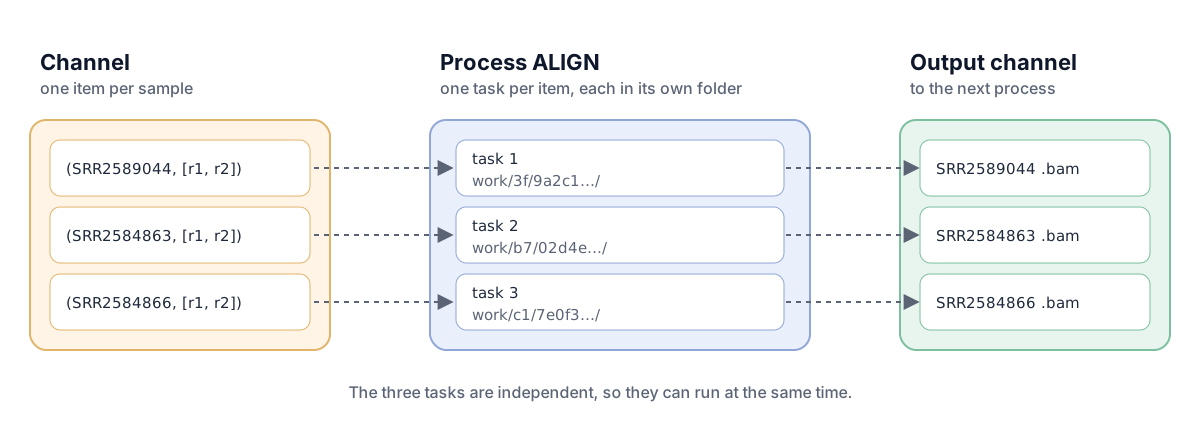
- Channels carry data (files and values); processes run code
- A task is one run of a process, for one item of its input channel
Anatomy of a process
process ALIGN {
    tag "${sample}"
    cpus 4
    input:
    tuple val(sample), path(reads)
    tuple path(genome), path(index)
    val bwa_extra
    output:
    tuple val(sample),
          path("${sample}.aligned.sorted.bam"),
          path("${sample}.aligned.sorted.bam.bai")
    script:
    """
    bwa mem -t ${task.cpus} ${bwa_extra} ...
    samtools sort ...
    """
}- input: what one task gets from each channel
- output: what it emits, here with the sample name kept alongside
- script: the commands, run in the task’s own folder
- directives:
cpus,memory,tag; alsocondaorcontainerfor per-process software
Anatomy of a workflow
workflow {
    main:
    ch_samples = channel.fromPath(params.samples)
        .splitCsv(header: true, sep: '\t')
        .map { row -> tuple(row.sample, [file(row.fastq_1), file(row.fastq_2)]) }

    ch_fastqc  = FASTQC(ch_samples)
    ch_multiqc = MULTIQC(ch_fastqc.zip.collect())    // wait for all, then one task
    ch_bam     = ALIGN(ch_samples, PREPARE_REFERENCE(params.reference_gz), params.bwa_extra)
    ...
    publish:
    final_variants = ch_final                         // copied to results/nextflow/vcf
}
Processes are called like functions; their outputs are channels for the next.
Every task in its own folder
work/3f/9a2c1.../   .command.sh  .command.err  SRR2584866_variants.vcf → (link)
work/b7/02d4e.../ ...- Tasks are isolated and cached
-resume: only changed tasks rerun- Same mechanism runs tasks on a laptop, a cluster or the cloud
Same config, same answer
SRR2584863_final_variants.vcf: identical (25 variants)
SRR2584866_final_variants.vcf: identical (775 variants)
SRR2589044_final_variants.vcf: identical (10 variants)
Running Nextflow
| Command | Does |
|---|---|
nextflow run main.nf |
run the workflow |
nextflow run main.nf -resume |
reuse cached tasks, rerun only what changed |
nextflow run main.nf -params-file config/config.yaml |
settings from a file (we share Snakemake’s) |
nextflow run main.nf --min_depth 10 |
change one parameter |
nextflow run main.nf -profile slurm |
a profile from nextflow.config, e.g. for a cluster |
nextflow run main.nf -with-docker |
run each process in a container |
Snakemake or Nextflow?
| Snakemake | Nextflow | |
|---|---|---|
| language | Python | Nextflow (Groovy-based) |
| connects steps by | file names (“pull”) | channels (“push”) |
| data | files | files and values |
| runs jobs in | the project folder | one folder per task, in work/ |
| plan before running | -n lists every job and why |
-preview checks the script only |
Which is best? Both work: on our pipeline they give identical results. Pick the one your field and your collaborators use.
nf-core: do not write what already exists
- Peer-reviewed community pipelines (RNA-seq, variant calling, …)
- Containers or Conda environments for every process, test data, docs
- Always pin a release:
nextflow run nf-core/demo -r 1.2.0 -profile test,docker
Think, pair, share
3 minutes. For your own project: Pixi tasks only, Snakemake, Nextflow, or an nf-core pipeline? Why?
Quiz
- What connects Nextflow processes? (a) file names (b) channels (c) Makefiles
- What does
-resumedo? (a) restart from scratch (b) reuse cached tasks, rerun only what changed (c) resume a paused laptop - You launch from
workflow/nextflow/and get “does not exist”. Why? (a) Nextflow bug (b) relative paths are resolved from the launch folder
Recap
- Processes + channels + workflow outputs
- One task per folder in
work/;-resumereuses them - Same steps, options and locked software: identical to Snakemake
- Home: tutorial 10, then Seqera’s Hello Nextflow
Sources
- Tools for Reproducible Research, NBIS. CC BY 4.0. https://nbisweden.github.io/workshop-reproducible-research/
- Di Tommaso P et al. (2017). Nextflow enables reproducible computational workflows. Nat Biotechnol 35:316–319. https://doi.org/10.1038/nbt.3820
- Ewels PA et al. (2020). The nf-core framework for community-curated bioinformatics pipelines. Nat Biotechnol 38:276–278. https://doi.org/10.1038/s41587-020-0439-x
- Nextflow documentation: https://docs.seqera.io/nextflow/
- Diagram ‘Channels, processes, tasks’: own work, CC BY 4.0, after the NBIS slide.
Text and slides CC BY 4.0 unless marked otherwise. Full list: Sources and credits.
CBIO7501: The Art of Reproducible Research - CC BY 4.0