The LTEE example project
The one analysis that runs through every lesson
The question
How many mutations did E. coli accumulate over 50,000 generations of the Long-Term Evolution Experiment (Tenaillon et al., 2016), and is that answer robust to how strictly we filter the variant calls? The pipeline is a tool for that question, not a recipe: the report compares four depth thresholds and records a decision.
The experiment
In 1988 Richard Lenski started twelve populations of Escherichia coli from the same ancestor and has propagated them ever since, freezing samples every 500 generations: the Long-Term Evolution Experiment (LTEE). We use three clones of population Ara-3, sequenced by Tenaillon et al. (2016) and prepared for teaching by Data Carpentry:
| Run | Clone | Generation | Notes |
|---|---|---|---|
| SRR2589044 | REL2181A | 5,000 | |
| SRR2584863 | REL7179B | 15,000 | |
| SRR2584866 | REL11365 | 50,000 | hypermutator; can use citrate |
The reads are a trimmed subset (175,000 pairs per sample, 115 MB to download, CC0) from figshare, https://doi.org/10.6084/m9.figshare.7726454; the reference is E. coli B str. REL606 (GenBank CP000819.1).
The pipeline
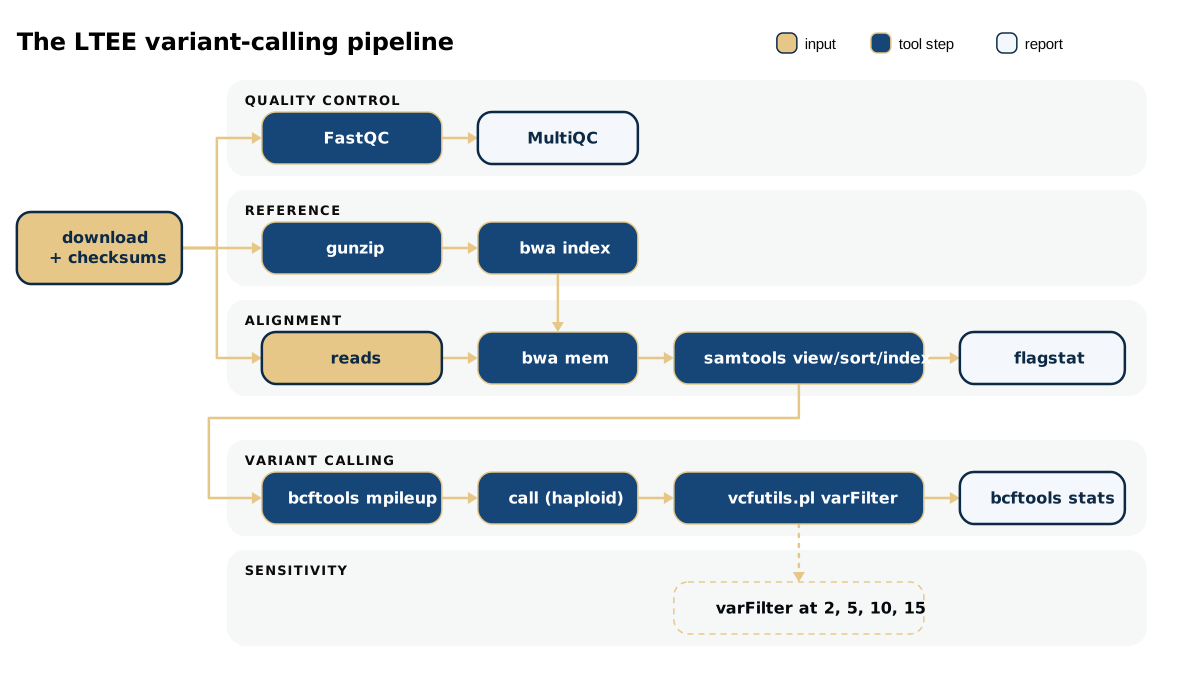
The steps and options are those of the Data Carpentry Wrangling Genomics variant-calling episode, with FastQC and MultiQC added. On a normal laptop the whole pipeline takes under a minute.
Expected results (filtered variants, minimum depth 2): SRR2589044 10, SRR2584863 25, SRR2584866 775. The Data Carpentry lesson reports 10, 25 and 766 with the tool versions of 2018.
Which lesson adds what
| Lesson | What the project gains |
|---|---|
| 02 | the project, generated from the template |
| 03 | raw data, sources, checksums, sample sheet, download script |
| 04 | Git history, GitHub, pull requests, the lock file |
| 05 | the environments and tasks: download, QC and variant calling (shell script); the Reproduce Action reruns them |
| 06, 07 | an exploration notebook, then the Quarto report (data part, also in reproduce) |
| 08 | a Docker image built from pixi.lock |
| 09, 10 | Snakemake and Nextflow workflows, the variants section of the report |
| 11, 12 | README, license, citation; release with a DOI |
Handing it in
Your own ltee-project counts for 40% of the course grade. When you have finished lesson 12, hand in the address of its GitHub repository and the Zenodo DOI of its release. LTEE project lists what the repository should show and how it is checked. Your capstone, on your own research project, is assessed separately (capstone rubric, 30%).
The finished project
A complete copy of the project, as it looks after lesson 12, is in the course repository under tutorials/ltee-project/. Use it to catch up, or to compare with your own. Run it with:
cd tutorials/ltee-project
pixi run reproduce             # download, Snakemake, report
pixi run compare-workflows     # Snakemake and Nextflow agree
Citations
- Tenaillon O, Barrick JE, Ribeck N, et al. (2016). Tempo and mode of genome evolution in a 50,000-generation experiment. Nature 536:165–170. https://doi.org/10.1038/nature18959
- Data Carpentry, Wrangling Genomics: https://datacarpentry.github.io/wrangling-genomics/
- Data Carpentry Genomics Curriculum Example Data, figshare: https://doi.org/10.6084/m9.figshare.7726454