Version control with Git and GitHub
CBIO7501 · Lesson 04
Today you will
- record every change to the LTEE project, with who, when and why
- get deleted work back
- try ideas on branches and merge them, conflicts included
- share the project on GitHub and let GitHub rerun it
Why version control?
analysis_final_v2_REALLY_FINAL.py: history by file name- A laptop that is lost or stolen takes the only copy with it
- “Which code made Figure 3?” has no answer
Git is a version control system
Git is an open-source, distributed version control system created by Linus Torvalds in 2005
Git keeps a complete history of the project/code: like a shared drive that keeps versions, except that you decide when a version is saved, and why.
GitHub keeps a copy and adds review and automation.
Note: Git is made for text (code, config, Markdown), not for large or binary data files.
Terms you need to know
| repository |
the project folder plus its history (.git/) |
| commit |
a snapshot, with a message, an author and an ID |
| branch |
a separate line of work |
| remote |
another copy of the repository, e.g. on GitHub (origin) |
| push / pull |
send commits to / get commits from a remote |
| pull request |
a proposal to merge a branch, with review and checks |
Three steps, over and over
![Diagram: working copy, then 'stage changes' to the staging area, then 'commit changes' to the Git repository.]()
Figure: By Aziz Khan, CC BY 4.0
- Edit files:
git status shows what changed in the working directory
- Stage what belongs together:
git add FILE
- Commit it to the history:
git commit -m "Why this change"
Working with a remote
![Diagram: a remote repository in the cloud; local repository A clones, pulls, fetches and pushes; a second local copy B does the same.]()
Figure: By Aziz Khan, CC BY 4.0
git clone: your own full copy, history includedgit push: send your commits to GitHubgit pull: get the others’ commits (fetch + merge)- Every copy (yours, your labmate’s, GitHub’s) has the whole history
What goes into Git?
| scripts, workflows, config |
raw data (download it: scripts/download_data.py) |
pixi.toml, pixi.lock |
.pixi/ (rebuilt from the lock file) |
| report and notebook sources |
rendered HTML, notebook outputs |
| metadata, checksums, README |
results (rebuilt by pixi run reproduce) |
.gitignore makes this automatic.
.pixi/*
!.pixi/config.toml

data/raw/**
!data/raw/README.md
.
.
Branches and pull requests
main          ●───●───────────●   (merge)
                   \         /
lesson-04-readme    ●───●───●     push → pull request → review + checks → merge
From now on: one branch and one pull request per lesson.
![Two branches leave main, one above and one below. Each gains commits while main stays still, then merges back.]()
Figure 1: A branch is a label that points at a commit. While add-fastqc and fix-ref-path gain commits, main stays where it is. Each branch is merged back when its work is ready.
A check on every push
The template’s GitHub Action runs on every push and pull request: a fresh Linux machine, a clean clone of your repository, then pixi run reproduce.
- For now
reproduce is a placeholder: the check is green but proves little
- Lesson 05 makes it download the data and run the pipeline
- From then on, a green check means: it rebuilds on a computer that has never seen it
Git is versatile
- Reproducibility: tag the commit that made the paper’s figures; it stays rerunnable however much the code changes afterwards
- Mistakes: any committed version can come back
- Structure: small commits with reasons make you think in steps
- Backup: the copy on GitHub survives your laptop
- Sharing: collaborators work on the same history, not on emailed files
![]() Figure: By Aziz Khan, CC BY 4.0
Think, pair, share
3 minutes. Your labmate leaves. You inherit a folder with 40 scripts and no history. Which three questions can you not answer? Which of them would Git have answered?
Quiz
- Which file should not be committed?
pixi.lock (b) data/raw/SRR2584863_1.trim.sub.fastq (c) scripts/download_data.py
You deleted a file and committed the deletion. Can Git restore it? (yes / no)
Two branches change the same line. What does git merge do?
- keeps the newest (b) stops with a conflict for you to resolve (c) keeps both lines
Recap
- Commit small, related changes with clear messages; push often
- Commit what people write; ignore what programs rebuild
- Committed work can always be recovered
- Branch, pull request, green check, merge
Now: tutorial 04.
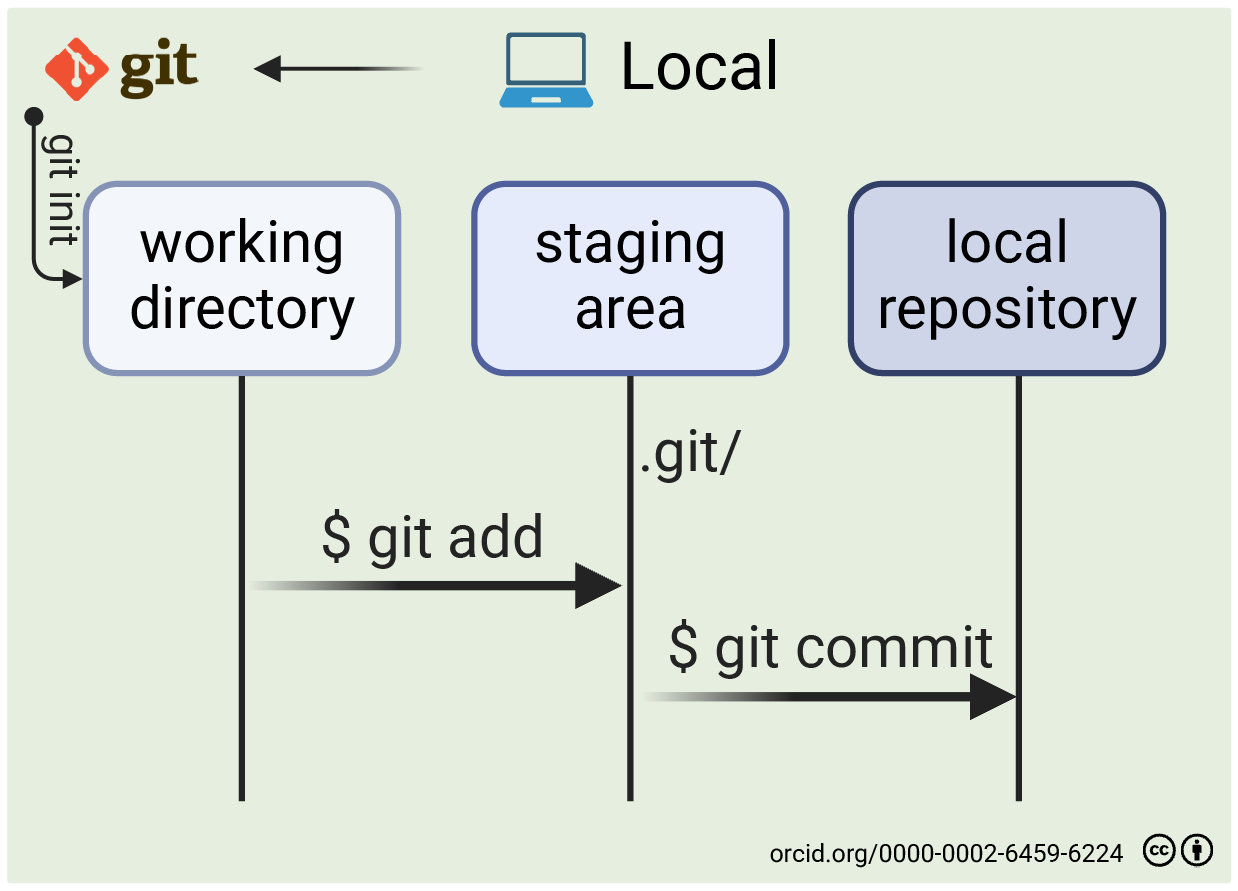
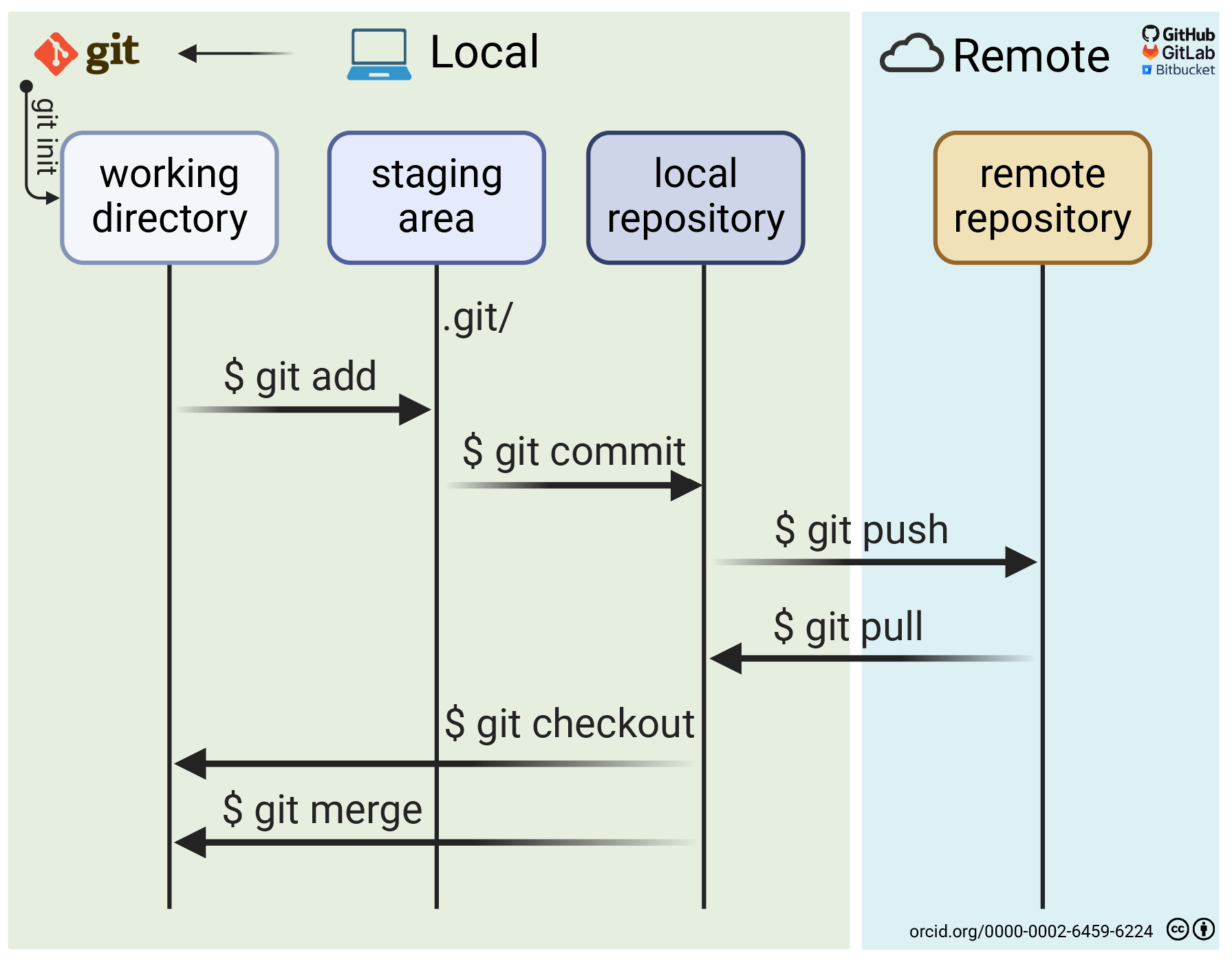
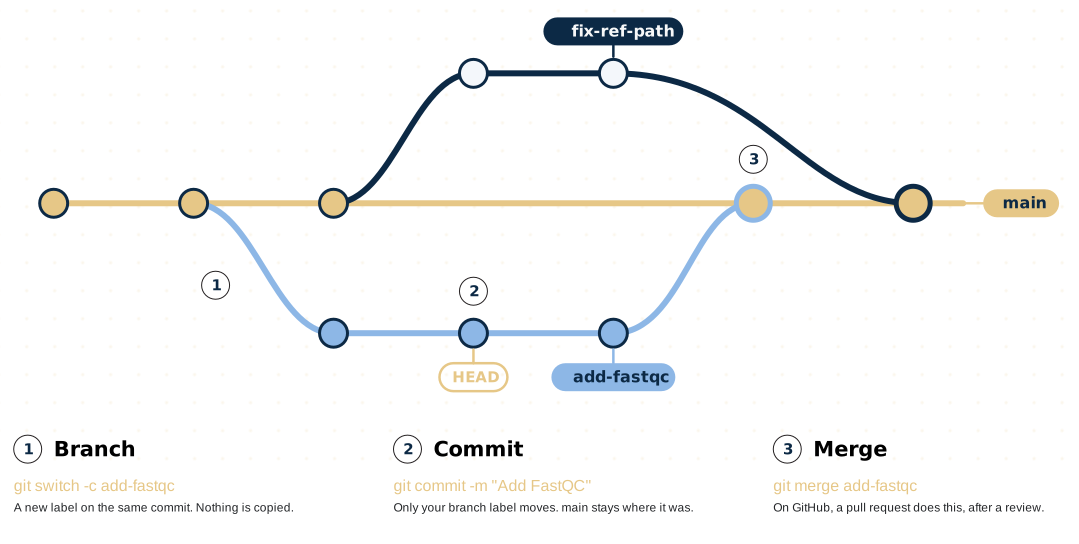
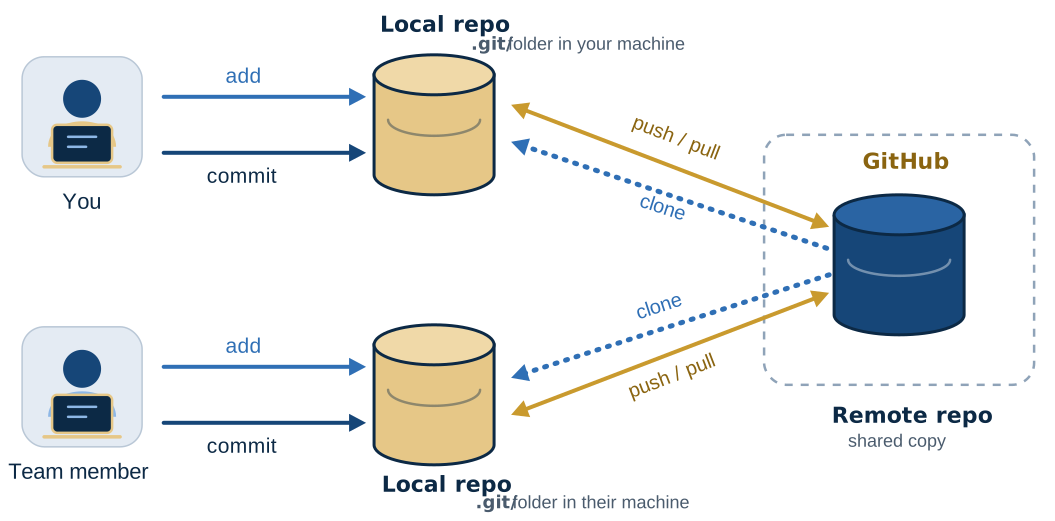 Figure: By Aziz Khan, CC BY 4.0