Project organization
CBIO7501 · Lesson 02
Today you will
- design a project layout on paper, then generate one from a template
- keep raw data read-only and make results rebuildable
- name files so people and programs can read them
- use relative paths so the project runs on any computer
Which file is the latest?
$ ls -l results/
-rw-r--r--  ada  Oct 12 22:00  variants.xlsx
-rw-r--r--  ada  Oct 16 11:39  variants_final.xlsx
-rw-r--r--  ada  Oct 18 22:41  variants_final_v2.xlsx
-rw-r--r--  ada  Oct 18 13:25  variants_USE_THIS.xlsx
-rw-r--r--  ada  Oct 15 22:39  variants_v2_ADA.xlsx
And which script and which input made it?
Who reads your project?
- You, in six months: you will not remember
- A labmate who takes over the analysis
- A reviewer who wants to rerun one figure
- A program (CI, a workflow manager) that needs predictable paths
Organization is not one of the five pillars of reproducibility (literate programming, version control, environments, data sharing, documentation), but every pillar is easier when files are where everyone expects them.
Think, pair, share
5 minutes, on paper. You will analyze 6 FASTQ files (3 samples), a reference genome and a sample table, with scripts, a pipeline, a report and a software environment.
- Draw your folders. Put every item in one.
- Mark what you would never edit and what you could delete and rebuild.
- Compare with your neighbor: where do you disagree?
Two published answers
Noble 2009
project/
  doc/
  data/
  src/
  bin/
  results/
    2009-01-15/
    2009-01-23/
Wilson et al. 2017
project/
  README  LICENSE  CITATION
  requirements.txt
  data/
  doc/
  results/
  src/
Both: one folder per project, raw data untouched, results made by code.
A third answer: shaped by the workflow
config/
  config.yaml
profiles/
workflow/
  Snakefile
  rules/
  envs/
  scripts/
  schemas/
LICENSE  README.md
The Snakemake workflow template: settings in config/, everything that runs in workflow/.
Our template borrows config/ and workflow/ from it, so the LTEE project can grow a workflow in lesson 09 without moving files.
The one rule
data/raw/ ──code──► data/processed/ ──code──► results/ ──► reports/
read-only           rebuildable                rebuildable
downloaded          not in Git                 not in Git
If you delete data/processed/ and results/, one command must bring them back. That command is the test of your organization.
Treasure your data
- Keep raw data read-only, exactly as downloaded
- Never save a second, “cleaned” copy by hand: write the cleaning as a script (or a notebook, a report, a workflow step), so it can be redone
- Back up: copies in more than one physical place
- Deposit raw data in a public repository as early as you can
Organize your code
- Do nothing by hand that a program could do: no copy-paste between files, no clicking through a spreadsheet
- Connect raw data to results with code: scripts, Quarto, Jupyter, Snakemake, Nextflow
- Keep settings apart from code: at the top of a script, or better in
config/config.yaml
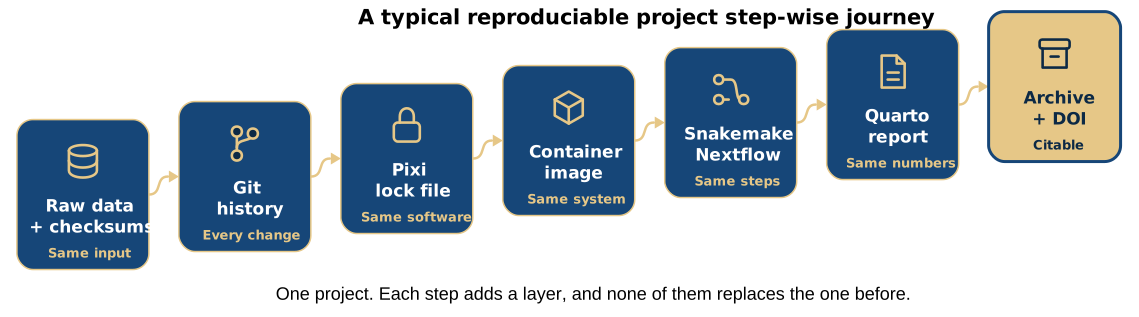
A typical reproducible project step-wise journey
What the project folder looks like at the end
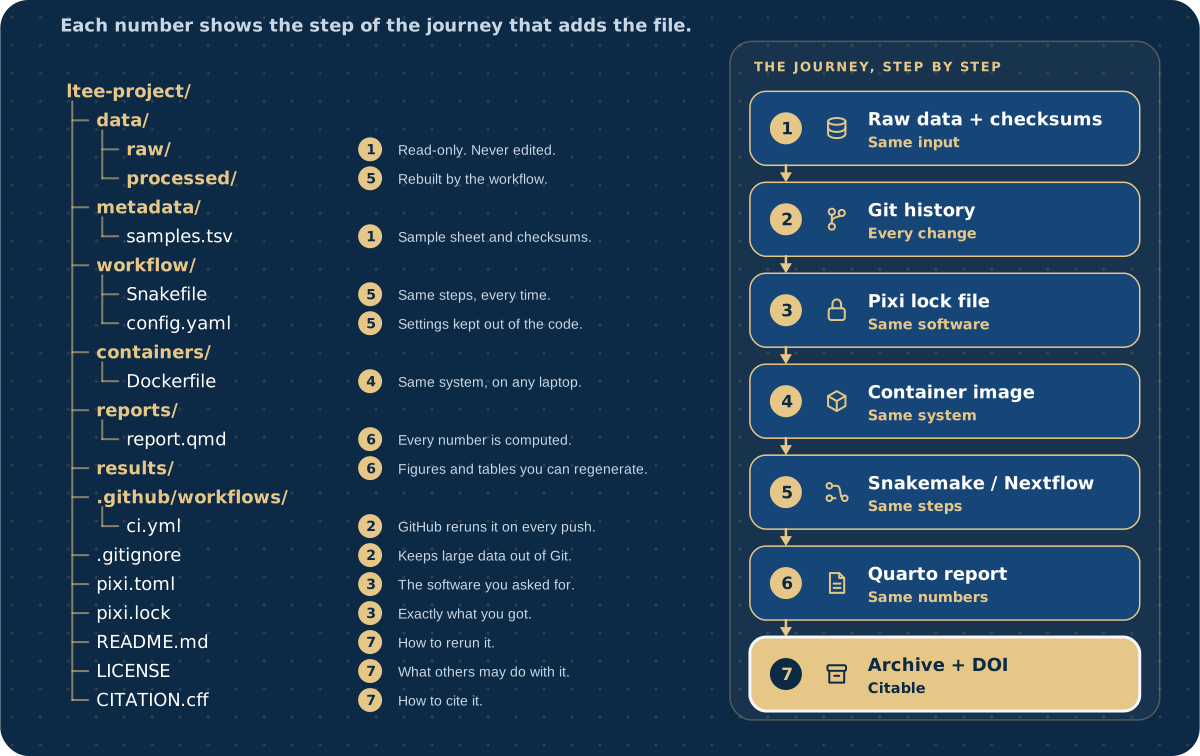
Our template
ltee-project/
├── README.md
├── LICENSE
├── CITATION.cff
├── data/
│   ├── raw/
│   └── processed/
├── metadata/
├── scripts/
├── config/
├── workflow/
├── containers/
├── notebooks/
├── reports/
├── results/
├── docs/
└── .github/workflows/reproduce.yml
One command creates it:
Why sketch first?
- A template is someone else’s decisions, frozen
- If you never made the decisions, you cannot defend or change them
- Sketch → compare with the literature → generate → discuss each difference
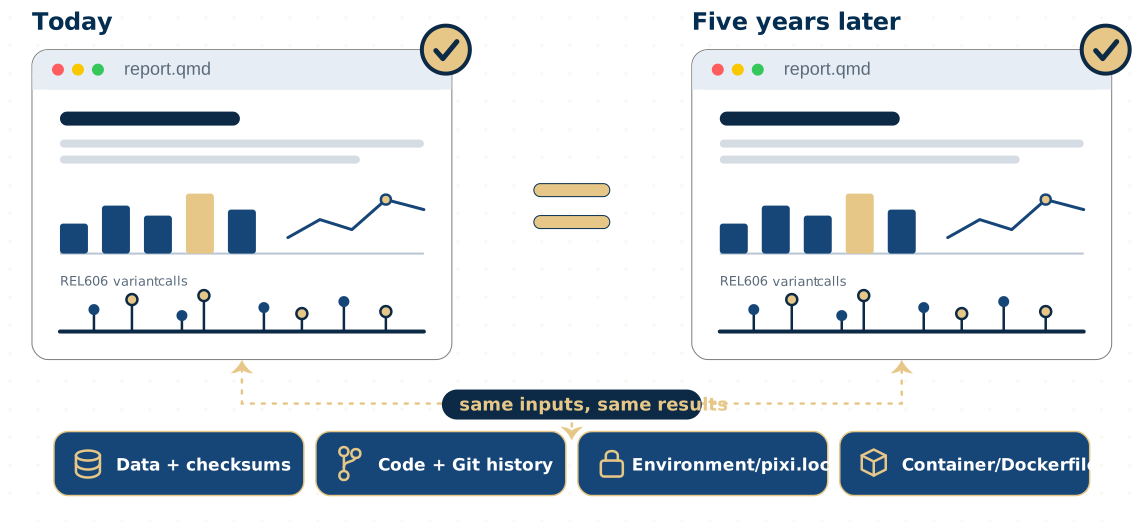
Can you reproduce your analysis in 5 years
Names that sort and explain
| Instead of | Write |
|---|---|
final results (use this).xlsx |
variant-counts.csv |
12-10-2026 run.bam |
SRR2584863.aligned.sorted.bam |
sample1 … sample10 … sample2 |
s01 … s02 … s10 |
results 5Aug.txt |
qc-summary_2026-08-05.txt |
No spaces · ISO dates · leading zeros · same parts in the same order
Relative, not absolute
Run every command from the project folder. The tutorial’s Break it exercise shows the absolute path failing.
Tools that help
On a cluster, over SSH
- VS Code Remote SSH
nano(easy) orvim(powerful)
Pick one editor and learn it well; it should show the whole project folder.
Quiz
- Where does the downloaded reference genome go?
results/(b)data/raw/(c)scripts/(d)data/processed/
- You found a wrong sample label in a raw FASTQ header. What do you do?
- edit the FASTQ (b) fix it in code and write to
data/processed/ - rename the file by hand (d) email the data provider and wait
- edit the FASTQ (b) fix it in code and write to
- Which name sorts correctly in time? (a)
5-Aug-2026(b)2026-8-5(c)2026-08-05
Recap
- Same layout in every project; decide it before the first file arrives
- Raw data read-only and downloaded by code; everything else rebuildable
- A template saves time; know why each folder exists
- Good names sort and explain; relative paths travel
Now: tutorial 02, then the lesson 03 hands-on.
Sources
- Tools for Reproducible Research, NBIS. CC BY 4.0. https://nbisweden.github.io/workshop-reproducible-research/
- FAIR in (biological) practice, The Carpentries Incubator. CC BY 4.0. https://carpentries-incubator.github.io/fair-bio-practice/
- Noble WS (2009). A quick guide to organizing computational biology projects. PLoS Comput Biol 5:e1000424. https://doi.org/10.1371/journal.pcbi.1000424
- Wilson G et al. (2017). Good enough practices in scientific computing. PLoS Comput Biol 13:e1005510. https://doi.org/10.1371/journal.pcbi.1005510
- Snakemake workflow template (MIT), layout as of 2026-03: https://github.com/snakemake-workflows/snakemake-workflow-template
- Ziemann M, Poulain P, Bora A (2023). The five pillars of computational reproducibility. Brief Bioinform 24:bbad375. https://doi.org/10.1093/bib/bbad375
Text and slides CC BY 4.0 unless marked otherwise. Full list: Sources and credits.
CBIO7501: The Art of Reproducible Research - CC BY 4.0